 浅念
浅念
434 lines
20 KiB
Markdown
434 lines
20 KiB
Markdown
# Cordova GoogleMaps plugin for Android, iOS and Browser v2.7.1
|
|
|
|
| Download | Build test (multiple_maps branch)|
|
|
|----------|---------------------------|
|
|
| [](https://npm-stat.com/charts.html?package=cordova-plugin-googlemaps) |[](https://travis-ci.org/mapsplugin/cordova-plugin-googlemaps/branches) |
|
|
|
|
This plugin displays Google Maps in your application.
|
|
This plugin uses these libraries for each platforms:
|
|
|
|
- Android : [Google Maps Android API](https://developers.google.com/maps/documentation/android/)
|
|
- iOS : [Google Maps SDK for iOS](https://developers.google.com/maps/documentation/ios/)
|
|
- Browser : [Google Maps JavaScript API v3](https://developers.google.com/maps/documentation/javascript/)
|
|
|
|
Both [PhoneGap](http://phonegap.com/) and [Apache Cordova](http://cordova.apache.org/) are supported.
|
|
|
|
<table>
|
|
<tr>
|
|
<td>
|
|
<h3>Android, iOS</h3>
|
|
<img src="https://raw.githubusercontent.com/mapsplugin/cordova-plugin-googlemaps-doc/master/v2.6.0/hello-world/image1.gif" height="300">
|
|
</td>
|
|
<td>
|
|
<h3>Browser</h3>
|
|
<img src="https://raw.githubusercontent.com/mapsplugin/cordova-plugin-googlemaps/master/images/browser_demo.gif" height="300">
|
|
</td>
|
|
</tr>
|
|
</table>
|
|
|
|
-----
|
|
|
|
## Guides
|
|
|
|
- [How to generate API keys?](https://github.com/mapsplugin/cordova-plugin-googlemaps-doc/blob/master/v2.6.0/api_key/README.md)
|
|
- [Hello, World](https://github.com/mapsplugin/cordova-plugin-googlemaps-doc/blob/master/v2.6.0/hello-world/README.md)
|
|
- [Hello, World (with PhoneGap Build)](https://github.com/mapsplugin/cordova-plugin-googlemaps-doc/blob/master/v2.6.0/hello-world-phonegap-build/README.md)
|
|
- [Trouble shootings](https://github.com/mapsplugin/cordova-plugin-googlemaps-doc/tree/master/troubleshootings/README.md)
|
|
|
|
## Quick install
|
|
|
|
```
|
|
$> cordova plugin add cordova-plugin-googlemaps
|
|
```
|
|
|
|
Then set your Google Maps API keys into your `config.xml` (Android / iOS).
|
|
|
|
```xml
|
|
<widget ...>
|
|
<preference name="GOOGLE_MAPS_ANDROID_API_KEY" value="(api key)" />
|
|
<preference name="GOOGLE_MAPS_IOS_API_KEY" value="(api key)" />
|
|
</widget>
|
|
```
|
|
|
|
For browser platform,
|
|
|
|
```js
|
|
// If your app runs this program on browser,
|
|
// you need to set `API_KEY_FOR_BROWSER_RELEASE` and `API_KEY_FOR_BROWSER_DEBUG`
|
|
// before `plugin.google.maps.Map.getMap()`
|
|
//
|
|
// API_KEY_FOR_BROWSER_RELEASE for `https:` protocol
|
|
// API_KEY_FOR_BROWSER_DEBUG for `http:` protocol
|
|
//
|
|
plugin.google.maps.environment.setEnv({
|
|
'API_KEY_FOR_BROWSER_RELEASE': '(YOUR_API_KEY_IS_HERE)',
|
|
'API_KEY_FOR_BROWSER_DEBUG': '' // optional
|
|
});
|
|
|
|
// Create a Google Maps native view under the map_canvas div.
|
|
var map = plugin.google.maps.Map.getMap(div);
|
|
|
|
```
|
|
|
|
## PhoneGap Build settings
|
|
|
|
```xml
|
|
<widget ...>
|
|
|
|
<!--
|
|
You need to specify cli-7.1.0 or greater version.
|
|
https://build.phonegap.com/current-support
|
|
-->
|
|
<preference name="phonegap-version" value="cli-8.1.1" />
|
|
</widget>
|
|
```
|
|
|
|
## Install optional variables (config.xml)
|
|
|
|
-  **PLAY_SERVICES_VERSION = (15.0.1)**<br>
|
|
The Google Play Services SDK version.
|
|
_You need to specify the same version number with all other plugins._
|
|
Check out the latest version [here](https://developers.google.com/android/guides/releases).
|
|
|
|
-  **ANDROID_SUPPORT_V4_VERSION = (27.1.1)**<br>
|
|
This plugin requires the Android support library v4.
|
|
_The minimum version is 24.1.0._
|
|
Check out the latest version [here](https://developer.android.com/topic/libraries/support-library/revisions.html).
|
|
|
|
-  **LOCATION_WHEN_IN_USE_DESCRIPTION**<br>
|
|
This message is displayed when your application requests **LOCATION PERMISSION for only necessary times**.
|
|
|
|
-  **LOCATION_ALWAYS_USAGE_DESCRIPTION**<br>
|
|
This message is displayed when your application requests **LOCATION PERMISSION for always**.
|
|
|
|
---------------------------------------------------------------------------------------------------------
|
|
|
|
## Please support this plugin activity.
|
|
|
|
In order to keep this plugin as free, please consider to donate little amount for this project.
|
|
|
|
[](https://www.paypal.com/cgi-bin/webscr?cmd=_donations&business=SQPLZJ672HJ9N&lc=US&item_name=cordova%2dgooglemaps%2dplugin¤cy_code=USD&bn=PP%2dDonationsBF%3abtn_donate_SM%2egif%3aNonHosted)
|
|
|
|
---------------------------------------------------------------------------------------------------------
|
|
|
|
## Release Notes
|
|
|
|
- **v2.7.1**
|
|
- Fix: (iOS) UiWebView references present in v2.7.0
|
|
|
|
- **v2.7.0**
|
|
- Re-adoption: <a href="https://github.com/mapsplugin/cordova-plugin-googlemaps-sdk" target="_blank">cordova-plugin-googlemaps-sdk dependency</a>
|
|
- Important update: No longer support `UIWebView` on iOS. `WKWebView` only.
|
|
- Fix: (iOS) Can't load image files from local host on ionic 4 / 5
|
|
- Update: (Android) prevent null pointer error in AsyncLoadImage.java
|
|
- Fix: Css animation interference when call setDiv and there is a push/pop page
|
|
- Fix: (Android/iOS/Browser) KML parser crash
|
|
- Fix: flickering and wrong rendering of some DOM elements
|
|
- Add: `map.stopAnimation()`
|
|
- Fix: can't remove map while map.animateCamera() is running
|
|
- Update: (Android) Increase cache memory size
|
|
- Update: (Android/iOS) Danish localization
|
|
- Fix: (Android) Prevent resize event after `map.setDiv(null)`
|
|
- Fix: (Android/iOS) Can not interactive with the map inside <form>
|
|
- Fix: jslint errors
|
|
- Fix: marker.setIcon crashes
|
|
- Update: Set default value range to heading and tilt
|
|
- Fix: (Android/iOS) touch detection is wrong after clicking on back button very soon.
|
|
- Fix: An error occurs when you click a marker of marker cluster #2660
|
|
- Remove promise-7.0.4-min.js.map
|
|
- Fix: (iOS) bug fix: App crashes if "bearing" property is "<null>"
|
|
- Fix: HTMLColor2RGBA() converts to incorrect value
|
|
- Fix: (Android) Can't load marker image from the Internet
|
|
- many bug fixes...
|
|
|
|
|
|
---------------------------------------------------------------------------------------------------------
|
|
|
|
## Demos
|
|
|
|
|
|
[Demo (Browser)](https://mapsplugin.github.io/HelloGoogleMap/)
|
|
|
|

|
|
|
|
|
|
---------------------------------------------------------------------------------------------------------
|
|
|
|
## Documentation
|
|
|
|
|
|
|
|
[All documentations are here!!](https://github.com/mapsplugin/cordova-plugin-googlemaps-doc/blob/master/v2.6.0/README.md)
|
|
|
|
https://github.com/mapsplugin/cordova-plugin-googlemaps-doc/blob/master/v2.6.0/README.md
|
|
|
|
**Quick examples**
|
|
<table>
|
|
<tr>
|
|
<td><a href="https://github.com/mapsplugin/cordova-plugin-googlemaps-doc/blob/master/v2.6.0/class/Map/README.md"><img src="https://github.com/mapsplugin/cordova-plugin-googlemaps/raw/master/images/map.png?raw=true"><br>Map</a></td>
|
|
<td><pre>
|
|
var options = {
|
|
camera: {
|
|
target: {lat: ..., lng: ...},
|
|
zoom: 19
|
|
}
|
|
};
|
|
var map = plugin.google.maps.Map.getMap(mapDiv, options)</pre></td>
|
|
</tr>
|
|
<tr>
|
|
<td><a href="https://github.com/mapsplugin/cordova-plugin-googlemaps-doc/blob/master/v2.6.0/class/Marker/README.md"><img src="https://github.com/mapsplugin/cordova-plugin-googlemaps/blob/master/images/marker.png?raw=true"><br>Marker</a></td>
|
|
<td><pre>
|
|
var marker = map.addMarker({
|
|
position: {lat: ..., lng: ...},
|
|
title: "Hello Cordova Google Maps for iOS and Android",
|
|
snippet: "This plugin is awesome!"
|
|
})</pre></td>
|
|
</tr>
|
|
<tr>
|
|
<td><a href="https://github.com/mapsplugin/cordova-plugin-googlemaps-doc/blob/master/v2.6.0/class/MarkerCluster/README.md"><img src="https://github.com/mapsplugin/cordova-plugin-googlemaps/blob/master/images/markercluster.png?raw=true"><br>MarkerCluster</a></td>
|
|
<td><pre>
|
|
var markerCluster = map.addMarkerCluster({
|
|
//maxZoomLevel: 5,
|
|
boundsDraw: true,
|
|
markers: dummyData(),
|
|
icons: [
|
|
{min: 2, max: 100, url: "./img/blue.png", anchor: {x: 16, y: 16}},
|
|
{min: 100, max: 1000, url: "./img/yellow.png", anchor: {x: 16, y: 16}},
|
|
{min: 1000, max: 2000, url: "./img/purple.png", anchor: {x: 24, y: 24}},
|
|
{min: 2000, url: "./img/red.png",anchor: {x: 32,y: 32}}
|
|
]
|
|
});</pre></td>
|
|
</tr>
|
|
<tr>
|
|
<td><a href="https://github.com/mapsplugin/cordova-plugin-googlemaps-doc/blob/master/v2.6.0/class/HtmlInfoWindow/README.md"><img src="https://github.com/mapsplugin/cordova-plugin-googlemaps/blob/master/images/htmlInfoWindow.png?raw=true"><br>HtmlInfoWindow</a></td>
|
|
<td><pre>
|
|
var html = "<img src='./House-icon.png' width='64' height='64' >" +
|
|
"<br>" +
|
|
"This is an example";
|
|
htmlInfoWindow.setContent(html);
|
|
htmlInfoWindow.open(marker);
|
|
</pre></td>
|
|
</tr>
|
|
<tr>
|
|
<td><a href="https://github.com/mapsplugin/cordova-plugin-googlemaps-doc/blob/master/v2.6.0/class/Circle/README.md"><img src="https://github.com/mapsplugin/cordova-plugin-googlemaps/blob/master/images/circle.png?raw=true"><br>Circle</a></td>
|
|
<td><pre>
|
|
var circle = map.addCircle({
|
|
'center': {lat: ..., lng: ...},
|
|
'radius': 300,
|
|
'strokeColor' : '#AA00FF',
|
|
'strokeWidth': 5,
|
|
'fillColor' : '#880000'
|
|
});</pre></td>
|
|
</tr>
|
|
<tr>
|
|
<td><a href="https://github.com/mapsplugin/cordova-plugin-googlemaps-doc/blob/master/v2.6.0/class/Polyline/README.md"><img src="https://github.com/mapsplugin/cordova-plugin-googlemaps/blob/master/images/polyline.png?raw=true"><br>Polyline</a></td>
|
|
<td><pre>
|
|
var polyline = map.addPolyline({
|
|
points: AIR_PORTS,
|
|
'color' : '#AA00FF',
|
|
'width': 10,
|
|
'geodesic': true
|
|
});</pre></td>
|
|
</tr>
|
|
<tr>
|
|
<td><a href="https://github.com/mapsplugin/cordova-plugin-googlemaps-doc/blob/master/v2.6.0/class/Polygon/README.md"><img src="https://github.com/mapsplugin/cordova-plugin-googlemaps/blob/master/images/polygon.png?raw=true"><br>Polygon</a></td>
|
|
<td><pre>
|
|
var polygon = map.addPolygon({
|
|
'points': GORYOKAKU_POINTS,
|
|
'strokeColor' : '#AA00FF',
|
|
'strokeWidth': 5,
|
|
'fillColor' : '#880000'
|
|
});</pre></td>
|
|
</tr>
|
|
<tr>
|
|
<td><a href="https://github.com/mapsplugin/cordova-plugin-googlemaps-doc/blob/master/v2.6.0/class/GroundOverlay/README.md"><img src="https://github.com/mapsplugin/cordova-plugin-googlemaps/blob/master/images/groundoverlay.png?raw=true"><br>GroundOverlay</a></td>
|
|
<td><pre>
|
|
var groundOverlay = map.addGroundOverlay({
|
|
'url': "./newark_nj_1922.jpg",
|
|
'bounds': [
|
|
{"lat": 40.712216, "lng": -74.22655},
|
|
{"lat": 40.773941, "lng": -74.12544}
|
|
],
|
|
'opacity': 0.5
|
|
});
|
|
</pre></td>
|
|
</tr>
|
|
<tr>
|
|
<td><a href="https://github.com/mapsplugin/cordova-plugin-googlemaps-doc/blob/master/v2.6.0/class/TileOverlay/README.md"><img src="https://github.com/mapsplugin/cordova-plugin-googlemaps/blob/master/images/tileoverlay.png?raw=true"><br>TileOverlay</a></td>
|
|
<td><pre>
|
|
var tileOverlay = map.addTileOverlay({
|
|
debug: true,
|
|
opacity: 0.75,
|
|
getTile: function(x, y, zoom) {
|
|
return "../images/map-for-free/" + zoom + "_" + x + "-" + y + ".gif"
|
|
}
|
|
});</pre></td>
|
|
</tr>
|
|
<tr>
|
|
<td><a href="https://github.com/mapsplugin/cordova-plugin-googlemaps-doc/blob/master/v2.6.0/class/KmlOverlay/README.md"><img src="https://github.com/mapsplugin/cordova-plugin-googlemaps/blob/multiple_maps/images/kmloverlay.png?raw=true"><br>KmlOverlay</a></td>
|
|
<td><pre>
|
|
map.addKmlOverlay({
|
|
'url': 'polygon.kml'
|
|
}, function(kmlOverlay) { ... });</pre></td>
|
|
</tr>
|
|
<tr>
|
|
<td><a href="https://github.com/mapsplugin/cordova-plugin-googlemaps-doc/blob/master/v2.6.0/class/Geocoder/README.md"><img src="https://github.com/mapsplugin/cordova-plugin-googlemaps/blob/master/images/geocoder.png?raw=true"><br>Geocoder</a></td>
|
|
<td><pre>
|
|
plugin.google.maps.Geocoder.geocode({
|
|
// US Capital cities
|
|
"address": [
|
|
"Montgomery, AL, USA", ... "Cheyenne, Wyoming, USA"
|
|
]
|
|
}, function(mvcArray) { ... });</pre></td>
|
|
</tr>
|
|
<tr>
|
|
<td><a href="https://github.com/mapsplugin/cordova-plugin-googlemaps-doc/blob/master/v2.6.0/class/utilities/geometry/poly/README.md"><img src="https://github.com/mapsplugin/cordova-plugin-googlemaps/blob/master/images/poly.png?raw=true"><br>poly utility</a></td>
|
|
<td><pre>
|
|
var GORYOKAKU_POINTS = [
|
|
{lat: 41.79883, lng: 140.75675},
|
|
...
|
|
{lat: 41.79883, lng: 140.75673}
|
|
]
|
|
var contain = plugin.google.maps.geometry.poly.containsLocation(
|
|
position, GORYOKAKU_POINTS);
|
|
marker.setIcon(contain ? "blue" : "red");
|
|
</pre></td>
|
|
</tr>
|
|
<tr>
|
|
<td><a href="https://github.com/mapsplugin/cordova-plugin-googlemaps-doc/tree/master/v2.6.0/class/utilities/geometry/encoding/README.md"><img src="https://github.com/mapsplugin/cordova-plugin-googlemaps/blob/master/images/encode.png?raw=true"><br>encode utility</a></td>
|
|
<td><pre>
|
|
var GORYOKAKU_POINTS = [
|
|
{lat: 41.79883, lng: 140.75675},
|
|
...
|
|
{lat: 41.79883, lng: 140.75673}
|
|
]
|
|
var encodedPath = plugin.google.maps.geometry.
|
|
encoding.encodePath(GORYOKAKU_POINTS);
|
|
</pre></td>
|
|
</tr>
|
|
<tr>
|
|
<td><a href="https://github.com/mapsplugin/cordova-plugin-googlemaps-doc/blob/master/v2.6.0/class/utilities/geometry/spherical/README.md"><img src="https://github.com/mapsplugin/cordova-plugin-googlemaps/blob/master/images/spherical.png?raw=true"><br>spherical utility</a></td>
|
|
<td><pre>
|
|
var heading = plugin.google.maps.geometry.spherical.computeHeading(
|
|
markerA.getPosition(), markerB.getPosition());
|
|
label.innerText = "heading : " + heading.toFixed(0) + "°";
|
|
</pre></td>
|
|
</tr>
|
|
<tr>
|
|
<td><a href="https://github.com/mapsplugin/cordova-plugin-googlemaps-doc/blob/master/v2.6.0/class/locationservice/README.md"><img src="https://github.com/mapsplugin/cordova-plugin-googlemaps/blob/master/images/locationService.png?raw=true"><br>Location service</a></td>
|
|
<td><pre>
|
|
plugin.google.maps.LocationService.getMyLocation(function(result) {
|
|
alert(["Your current location:\n",
|
|
"latitude:" + location.latLng.lat.toFixed(3),
|
|
"longitude:" + location.latLng.lng.toFixed(3),
|
|
"speed:" + location.speed,
|
|
"time:" + location.time,
|
|
"bearing:" + location.bearing].join("\n"));
|
|
});
|
|
</pre></td>
|
|
</tr>
|
|
|
|
<tr>
|
|
<td><a href="https://github.com/mapsplugin/cordova-plugin-googlemaps-doc/blob/master/v2.6.0/class/StreetView/README.md"><img src="https://github.com/mapsplugin/cordova-plugin-googlemaps/raw/master/images/streetview.png?raw=true"><br>StreetView</a></td>
|
|
<td><pre>
|
|
var div = document.getElementById("pano_canvas1");
|
|
var panorama = plugin.google.maps.StreetView.getPanorama(div, {
|
|
camera: {
|
|
target: {lat: 42.345573, lng: -71.098326}
|
|
}
|
|
});</pre></td>
|
|
</tr>
|
|
</table>
|
|
|
|
|
|
---------------------------------------------------------------------------------------------------------
|
|
|
|
### What is the difference between this plugin and Google Maps JavaScript API v3?
|
|
|
|
Google Maps JavaScript API v3 works on any platforms,
|
|
but it does not work if device is **offline**.
|
|
|
|
This plugin uses three different APIs:
|
|
- Android : [Google Maps Android API](https://developers.google.com/maps/documentation/android/)
|
|
- iOS : [Google Maps SDK for iOS](https://developers.google.com/maps/documentation/ios/)
|
|
- Browser : [Google Maps JavaScript API v3](https://developers.google.com/maps/documentation/javascript/)
|
|
|
|
In Android and iOS applications, this plugin displays native Google Maps views, which is **faster** than Google Maps JavaScript API v3.
|
|
And it even works if the device is **offline**.
|
|
|
|
In Browser platform, this plugin displays JS map views (Google Maps JavaScript API v3).
|
|
It should work as PWA (progressive web application), but the device has to be **online**.
|
|
|
|
In order to work for all platforms, this plugin provides **own API** instead of each original APIs.
|
|
You can write your code `similar to` the Google Maps JavaScript API v3.
|
|
|
|
**Feature comparison table**
|
|
|
|
| | Google Maps JavaScript API v3 | Cordova-Plugin-GoogleMaps(Android,iOS)| Cordova-Plugin-GoogleMaps(Browser) |
|
|
|----------------|-----------------------------------|---------------------------------------|---------------------------------------|
|
|
|Rendering system| JavaScript + HTML | JavaScript + Native API's | JavaScript |
|
|
|Offline map | Not possible | Possible (only your displayed area) | Not possible |
|
|
|3D View | Not possible | Possible | Not possible |
|
|
|Platform | All browsers | Android and iOS applications only | All browsers |
|
|
|Tile image | Bitmap | Vector | Bitmap |
|
|
|
|
**Class comparison table**
|
|
|
|
| Google Maps JavaScript API v3 | Cordova-Plugin-GoogleMaps |
|
|
|-----------------------------------|---------------------------------------|
|
|
| google.maps.Map | Map |
|
|
| google.maps.Marker | Marker |
|
|
| google.maps.InfoWindow | Default InfoWindow, and HtmlInfoWindow|
|
|
| google.maps.Circle | Circle |
|
|
| google.maps.Rectangle | Polygon |
|
|
| google.maps.Polyline | Polyline |
|
|
| google.maps.Polygon | Polygon |
|
|
| google.maps.GroundOverlay | GroundOverlay |
|
|
| google.maps.ImageMapType | TileOverlay |
|
|
| google.maps.MVCObject | BaseClass |
|
|
| google.maps.MVCArray | BaseArrayClass |
|
|
| google.maps.Geocoder | plugin.google.maps.geocoder |
|
|
| google.maps.geometry.spherical | plugin.google.maps.geometry.spherical |
|
|
| google.maps.geometry.encoding | plugin.google.maps.geometry.encoding |
|
|
| google.maps.geometry.poly | plugin.google.maps.geometry.poly |
|
|
| (not available) | MarkerCluster |
|
|
| google.maps.KmlLayer | KmlOverlay |
|
|
| (not available) | LocationService |
|
|
| google.maps.StreetView | StreetView :sparkles: |
|
|
| google.maps.Data | (not available) |
|
|
| google.maps.DirectionsService | (not available) |
|
|
| google.maps.DistanceMatrixService | (not available) |
|
|
| google.maps.TransitLayer | (not available) |
|
|
| google.maps.places.* | (not available) |
|
|
| google.maps.visualization.* | (not available) |
|
|
|
|
### How does this plugin work (Android, iOS)?
|
|
|
|
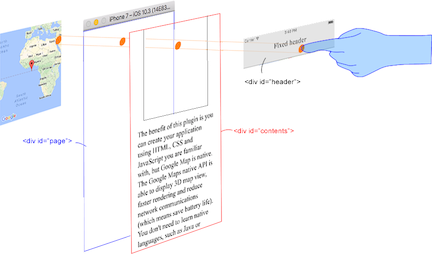
This plugin generates native map views, and puts them **under the browser**.
|
|
|
|
The map views are not HTML elements. This means that they are not a `<div>` or anything HTML related.
|
|
But you can specify the size and position of the map view using its containing `<div>`.
|
|
|
|
This plugin changes the background to `transparent` in your application.
|
|
Then the plugin detects your touch position, which is either meant for the `native map` or an `html element`
|
|
(which can be on top of your map, or anywhere else on the screen).
|
|
|
|

|
|
|
|
The benefit of this plugin is the ability to automatically detect which HTML elements are over the map or not.
|
|
|
|
For instance, in the image below, say you tap on the header div (which is over the map view).
|
|
The plugin will detect whether your tap is for the header div or for the map view and then pass the touch event appropriately.
|
|
|
|
This means **you can use the native Google Maps views similar to HTML elements**.
|
|
|
|
|
|
|
|
|
|
---------------------------------------------------------------------------------------------------------
|
|
## Official Communities
|
|
|
|
- Gitter : (managed by @Hirbod)
|
|
|
|
https://gitter.im/nightstomp/cordova-plugin-googlemaps
|